 Java4Shell Guide

CVE-2026-114938 · Java security flaw
Java4Shell,
explained.

A flaw in Java can let an attacker steal data, crash an app or run code with its permissions. Not every Java app is affected: its Java version, processor and data handling all matter. [1]
18 Nov update Azul Prime also needs checking on Java 8 and 11.
What is Java4Shell?
Java runs many business apps and servers. Java4Shell affects how it reads Base64, a way to represent data as text. Malicious data can corrupt an app’s memory, sometimes before a login is checked. [4]
Updating Log4j does not fix this. Java4Shell needs the Java or app maker’s update. More questions answered →
Who can be affected?
All three conditions must apply, with Java’s faster Base64 decoder enabled.
- An affected Java version
- Unfixed releases from Java 17.0.6 onwards, including 21, 25 and 27. Some vendor products also need separate checks below. Fixed versions →
- A matching processor
- Intel or AMD x86-64 with AVX-512 VBMI. Native ARM64 Java is outside this scope. Check the server or virtual machine running the app. Processor details →
- Attacker-controlled data
- The app passes hostile data to Java’s affected decoder—for example, through sign-ins, uploads or a server’s response to a Java client. Examples →
Java 8 and 11: standard OpenJDK 8 and 11 are outside the published scope. Oracle Java 8 Enterprise Performance Pack and Azul Prime (formerly Zing) are exceptions. Check the product-specific fixes →
Researchers have demonstrated attacks against real apps. The reviewed sources do not establish attacks in the wild. Evidence and limits →
If you run a Java service
Start with internet-facing services, especially sign-in systems.
Update the Java the app actually uses
Use your Java supplier’s fix. If the app includes Java, use the app maker’s update. For containers, rebuild or replace the image. Updating only the host may leave these copies unchanged.
Find the fixed versions →Restart and check every running instance
Restart the app or deploy new containers. Check the Java version inside each running instance; an installed update alone is not enough.
Commands to check the running version →Record what still needs fixing
Give each unresolved service an owner and next action. Investigate suspicious activity: an update does not undo an earlier compromise.
If you use an app
Installed app: follow the maker’s Java4Shell update advice, or your IT team’s instructions on a work device. Some apps include Java; updating a separate Java installation may not fix them.
Online service: the provider must update its servers. Check its service notice or ask whether it has fixed CVE-2026-114938. Updating your browser cannot fix its servers.
If you brief a team
For each affected or unchecked service, name an owner and report its status:
- Fixed: updated and restarted; the running version is confirmed.
- Temporarily protected: the workaround is confirmed; the update is still planned.
- Unresolved: name the next action and review time.
Optional tools
Check Java output
Paste version or diagnostic output to see what it confirms and what still needs checking.
Customise an AI prompt
Six editable templates for a service review, patch plan, vendor enquiry or team update.
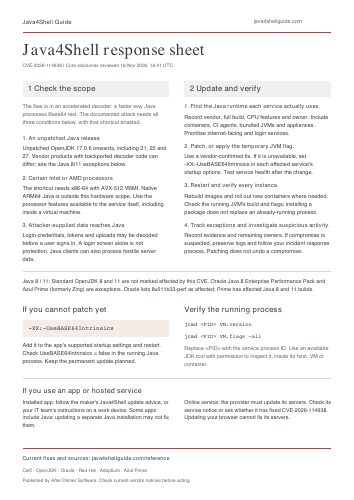
Download the response sheet
One printable page of affected systems, actions and checks.